
IGNOU Assignment Front Page 2026 – Format and Download PDF Sample

IGNOU assignment front page is a mandatory part of your assignment submission, and every student must include it before submitting their work.
Hey! If you’re working on your IGNOU assignments and wondering, “Wait… do I need to add some kind of front page in IGNOU assignments too?”
Yep, you do. And trust me, you’re not alone—I had the same doubt when I was submitting mine for the first time.
That front page isn’t just a formality. It’s kind of like an ID card for your assignment. It tells the evaluator exactly who you are, what subject the assignment is for, and where it needs to go.
In this post, I’ll show you:
- What to write on the front page of IGNOU Assignment (don’t worry, I’ve got a full list)
- Where to download a ready-made PDF
- And a few tips to avoid silly mistakes (which, honestly, a lot of us make)
Let’s get started.
If you’re not sure how to prepare your assignment, you can also read our complete guide on How to Write IGNOU Assignment to avoid common mistakes.
What is IGNOU Assignment Front Page?
The IGNOU assignment front page, also known as the IGNOU assignment cover page, is the first page you attach to your assignment before submitting it.
It may look simple, but it’s not optional—it’s a required part of every assignment submission.
This front page helps the university identify your details, such as your enrolment number, course code, and programme, so your assignment can be processed correctly.
Think of it like labeling a package.
Without a properly filled IGNOU front page format, your assignment might not reach the right evaluator or could get delayed in processing.
So yes, it’s a small step—but a very important one. The good news? It’s also super easy to create.
Related Article:
What to Write on IGNOU Front Page?
When preparing your IGNOU assignment front page, it’s important to include all the required details in the correct format.
A properly filled IGNOU assignment cover page ensures that your assignment is identified and evaluated without any confusion.
Here are the details you must include in the IGNOU front page format:
- Your full name
- Your enrolment number (triple-check this one!)
- Programme name (like BA, MA, BCOMG, etc.)
- Course code (e.g., BEGC-102, MPCE-011)
- Course title
- Assignment number (like Assignment 1 or 2)
- Study centre code and name
- Regional centre name
- Session (January 2026 or July 2025)
- Your mobile number & email ID
- Date of submission
- And finally, your signature ✍️
If you’re handwriting your assignment, you can write all this neatly on a blank A4 sheet. Or, if you’re like me and prefer a shortcut…
Note: Use clean handwriting or typed format. Attach a new front page for each subject.
Make sure all details are accurate and clearly written, as even small mistakes can create issues in evaluation.
Many students search for IGNOU assignment front page format PDF, but before downloading, it’s important to understand what each field means.
If you’re also looking to download assignments, you can check our guide on IGNOU Assignment Download to get the latest question papers.
Watch: IGNOU Assignment Front Page – How to Fill (2026 Video Guide)
Download IGNOU Assignment Front Page PDF
If you don’t want to create the IGNOU assignment front page format manually, you can simply download a ready-made template and use it for your assignments.
Before using any template, make sure it contains all the important fields like enrolment number, course code, programme name, study centre, and submission date.
Using a proper IGNOU assignment cover page PDF also reduces the chances of mistakes during submission.
I’ve made a simple front page format you can download, print, and just fill in your details. Saves you the headache and makes things look neat too.
Print it, fill it, and attach it as the first page of each subject’s assignment. That’s it.
If you’re planning to submit your assignment online, you can also read our step-by-step guide on How to Submit IGNOU Assignment Online.
Sample IGNOU Assignment Front Page
An Example for Clarity
Here’s a sample IGNOU assignment front page:
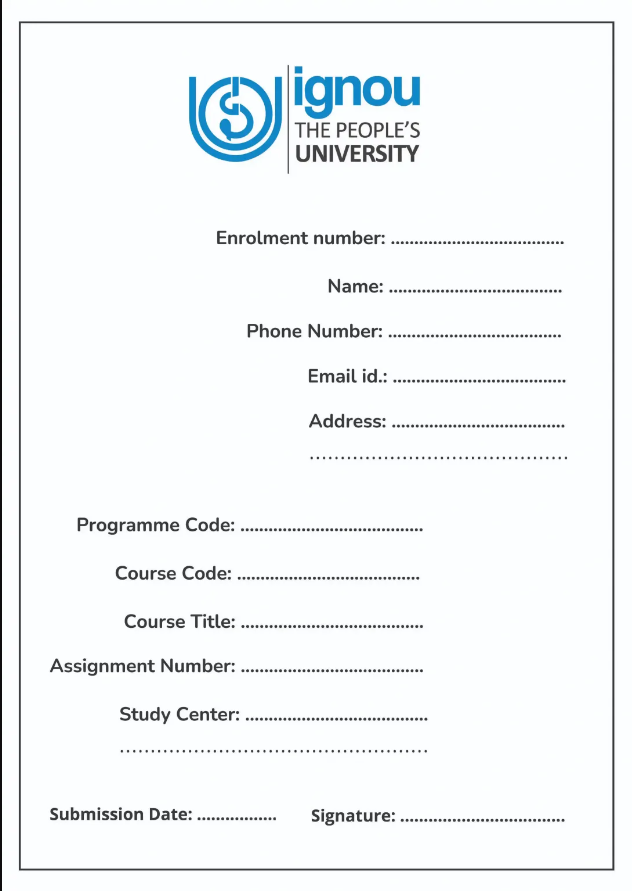
This example adheres to the formatting guidelines, ensuring clarity and readability. The use of a clear title and central alignment enhances the overall appearance of the front page.
Sample IGNOU Assignment Front Page Filled 2026
A typical IGNOU assignment cover page includes all your basic academic details in a structured format.
An Example for Clarity
Here’s a filled-in sample of IGNOU assignment front page:
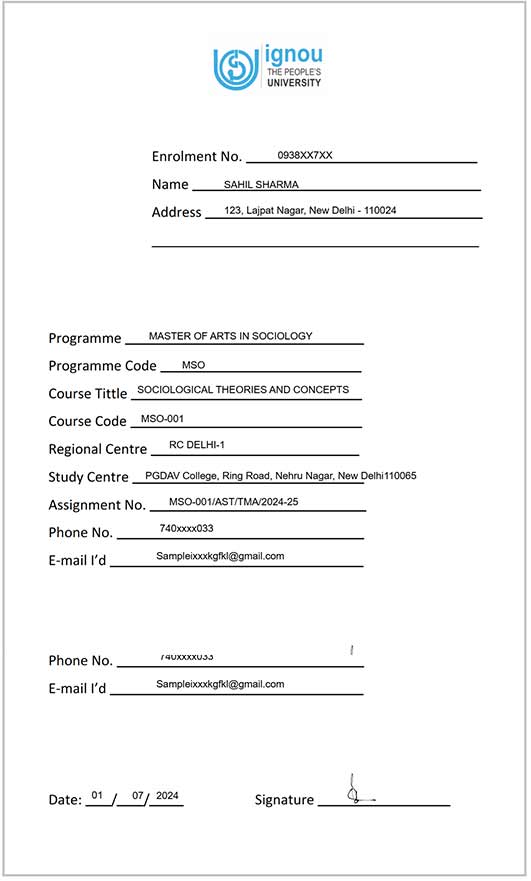
This is the standard IGNOU front page format that most students follow.
You don’t need to make it fancy—just keep it clean, readable, and correctly filled
If you want to track your submission, you can check your progress through IGNOU Assignment Status after submitting your assignment.
Here’s How I Usually Fill It
I’ve submitted quite a few assignments by now, so here’s how I usually fill the IGNOU Assignment front page:
- I always write everything in clear block letters—especially the course code.
- I use a blue or black pen (never pencil, and definitely no glitter pens 😅).
- I fill out every field—even the optional ones, just in case.
- If I make a mistake? I just print a new page. No overwriting.
- And I always sign at the bottom before attaching it.
Takes me about 3–4 minutes tops. Super simple.
Common Mistakes to Avoid
I’ve helped quite a few friends with their assignments and here are some mistakes I’ve seen:
- Leaving out the study centre name
- Writing the wrong course code
- Forgetting to mention the session (e.g., July 2025)
- Not signing the front page
- Using short forms or nicknames
Even a small mistake in the IGNOU front page format can lead to confusion or delay in processing your assignment.
That’s why it’s always better to double-check all details before submission.Just take a minute to go through your front page before submitting—it really helps avoid unnecessary stress later.
Before submitting, you should also check the latest IGNOU Assignment Last Date to avoid missing deadlines.
Why IGNOU Front Page is Important
Good question. You might think it’s just for looks, but nope—it actually plays a big role.
It helps IGNOU:
- Match your assignment with your course and enrolment number
- Send it to the right evaluator
- Avoid any confusion with similar names or codes
- And most importantly—ensure your marks are updated properly
Without the front page, your assignment can get lost in the system. That’s the last thing you want after putting in all that hard work.
If your marks are not updated after submission, you can check our guide on IGNOU Assignment Marks Not Updated in Grade Card to resolve the issue.
Final Tips Before Submitting Your IGNOU Assignment
Before you submit your assignment, take a few minutes to review everything carefully.
A properly prepared IGNOU assignment front page along with well-written answers can help you avoid unnecessary issues during evaluation.
Here are some quick tips to follow:
- Make sure your IGNOU assignment cover page is properly filled
- Double-check enrolment number and course code
- Attach the front page correctly at the beginning
- Write all details clearly and neatly
- Keep your assignment clean and well-organized
- Don’t forget to sign the front page
- Submit before the deadline
Even small mistakes in the IGNOU front page format can create problems later, so it’s always better to review everything once before submission.
Taking these simple steps will help ensure that your assignment is accepted and evaluated without any delay.
Why Your Full Name Matters on IGNOU Assignment Front Page
Adding your full name on the IGNOU assignment front page may look like a small detail, but it plays an important role.
It helps clearly identify your assignment, especially when multiple submissions are handled together.
In some cases, your name also helps avoid confusion if there is any mismatch in records or similar enrolment details.
It also adds a personal touch, making it clear that the assignment belongs to you.
👉 Tip: Write your name neatly in the designated space without cluttering the IGNOU assignment cover page.
Should You Add Contact Details on Front Page?
Including contact details in your IGNOU assignment cover page is optional, but it can be useful.
If your evaluator needs clarification or there is any issue with your assignment, having your contact information makes communication easier.
It can also help in case of updates related to submission or evaluation.
However, always ensure that the information you provide is correct and active.
👉 Tip: If you don’t want to share personal details, you can use a separate email for academic purposes.
Keep IGNOU Assignment Front Page Simple
When designing your IGNOU front page format, always keep it simple and clean.
A minimal layout makes it easier for evaluators to read and identify important details quickly.
It also gives your assignment a more professional and organized appearance.
Avoid adding unnecessary colors, designs, or graphics that can distract from the actual information.
👉 Tip: Focus on clarity, not decoration.
That’s All From Me!
So yep—that’s everything you need to know about the IGNOU assignment front page. I know it seems like a small thing, but trust me, it matters more than most people realize.
I hope this helped! 😊
If you still have doubts or questions, feel free to drop a comment or message me. I’ve been through it too, and I’m happy to help however I can.
Good luck with your assignments—and don’t forget that front page! 👍
Frequently Asked Questions (FAQs)
Yes, without it your assignment won’t be processed.
Both are accepted. Just ensure clarity and accuracy.
No. Create a separate one for each subject.
On your IGNOU ID card or the official website.
Your assignment might get delayed or rejected.
Conclusion
The IGNOU assignment front page may look simple, but it plays an important role in your assignment submission.
By following the correct IGNOU front page format and filling in all details accurately, you can avoid unnecessary delays or issues during evaluation.
Keep it clean, clear, and properly structured.
A well-prepared front page not only meets IGNOU guidelines but also creates a good first impression.
Remember, the front page is your gateway to making a positive impression, so make it count. Best of luck with your IGNOU assignments!
Check our complete IGNOU Assignment guide if you don’t know how to start.

IGNOU Project Status 2026 – Complete Guide to Check Status on Official Portal

IGNOU.ac.in: Complete Guide to the Official IGNOU Website (Admissions, Results, Assignments & More)

IGNOU Degree Apply Online 2026 – Step-by-Step Guide to Get Your Degree Certificate
About Author

IgnouStudentZone
The person behind IGNOU student Zone is blogger by passion. His qualifications include B.E. Computers, MBA in Marketing, Google Certified in Digital Marketing.