
IGNOU Student Login 2026: Samarth Portal, Admission Login & Complete Guide
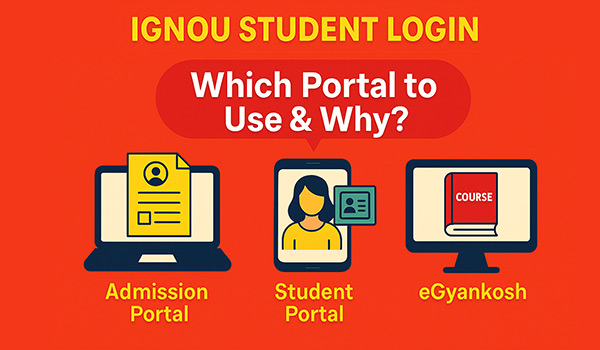
If you are trying to access IGNOU student login but feeling confused about which portal to use, you’re not alone. Have you ever opened the IGNOU website and wondered — should I log in through Samarth, Admission Portal, or somewhere else? And when you try one, nothing shows up… then you try another, and still get stuck?
This is one of the most common problems IGNOU students face.
Some students try to log in to the admission portal when they actually need the student portal. Others cannot find their ID card, hall ticket, or assignment details even after logging in. It feels like something is wrong, but in most cases, the issue is simple — using the wrong portal.
So how does IGNOU student login actually work? Which portal should you use, and when?
The truth is, IGNOU has a system — but it’s not explained clearly anywhere.
Once you understand it, everything becomes much easier.
In this guide, you’ll learn how to use IGNOU student login properly, which portal to choose for each task, how to fix login problems, and how to access important things like your IGNOU ID card, hall ticket, and study material without confusion.
If you are new, you can also check the IGNOU student help guide to understand your full journey step by step.
What Is IGNOU Student Login System?
So what exactly is IGNOU student login, and why does it feel so confusing?
The main reason is simple — IGNOU does not use just one login portal. Instead, it has multiple portals, and each one is designed for a specific purpose. This is where most students get stuck.
If you use the wrong portal, you may not see your details, which makes it look like something is not working.
Here’s how it actually works.
The admission portal is used only when you are applying for a course, paying fees, or checking your admission status. But once your admission is confirmed, you need to switch to the Samarth portal for all student-related activities.
This includes downloading your ID card, filling IGNOU exam form, checking updates, and managing your academic details.
Similarly, eGyankosh is a completely different platform used for accessing study material. In most cases, it does not even require a login.
👉 So the real problem is not the system — it’s understanding which portal to use.
Once you understand this, IGNOU student login becomes simple, and you can complete your tasks without confusion or errors.
Quick Answer: Which IGNOU Login Portal Should You Use?
Confused about IGNOU student login and not sure which portal to use?
Here’s a quick and simple breakdown that will solve it instantly:
| Task | IGNOU Login Portal |
|---|---|
| Admission / Fresh Registration | IGNOU Admission Portal |
| Re-registration (Next Year/Semester) | IGNOU Admission Portal |
| IGNOU ID Card Download | Samarth Student Portal |
| Hall Ticket Download | Samarth Student Portal |
| Exam Form Submission | Samarth Student Portal |
| Study Material (PDF) | eGyankosh |
👉 The rule is simple:
Different tasks = Different IGNOU login portals
If you try to log in to the wrong portal, your details may not appear. This often makes students think there is a login issue, but in reality, the system is working fine — you are just on the wrong platform.
Once you understand this mapping, IGNOU student login becomes much easier and faster to use.
IGNOU Samarth Portal (Main Student Dashboard)
So what is the IGNOU Samarth portal, and why is it so important for IGNOU student login?
The Samarth portal is your main student dashboard after your admission is confirmed. Once you receive your enrollment number, this becomes your primary login system where you manage almost everything related to your course.
👉 Official website: https://ignou.samarth.edu.in
From this point onward, most of your academic activities will happen through this portal. Whether it’s downloading documents or filling exam forms, this is the platform you will use regularly throughout your IGNOU journey.
Here’s what you can do inside the IGNOU Samarth portal:
- Download IGNOU ID card for exams and verification
- Download hall ticket before term-end exams
- Fill term-end exam (TEE) forms
- Check your course details and subjects
- View important announcements and updates
- Access assignment question papers
👉 In simple terms, this is your central hub for IGNOU student login and academic activities.
If you log in to any other portal for these tasks, you may not find the required information, which creates confusion for many students.
That’s why it is always a good idea to bookmark this portal and use it whenever you need to access your student dashboard.
IGNOU Samarth Portal Registration (First-Time Login)
Trying to log in to IGNOU student login but getting stuck?
One of the most common reasons is simple — you haven’t registered on the Samarth portal yet.
Here’s something important most students don’t know:
👉 IGNOU does NOT automatically create your login for the Samarth portal.
Even if you completed your admission, you still need to register separately before you can log in.
Quick Steps to Register on IGNOU Samarth Portal
- Go to https://ignou.samarth.edu.in
- Click on “New Registration”
- Enter your enrollment number
- Fill in the required details
- Create your password
- Complete the registration
Once your registration is complete, you can log in using:
- Enrollment number (username)
- Password (created during registration)
👉 After logging in, you will be able to understand IGNOU ID card download process, and use all student services.
If you want a detailed step-by-step guide, check: 👉 IGNOU Samarth portal registration guide
How to Login to IGNOU Student Portal (Step-by-Step)
Already registered but not sure how to complete IGNOU student login?
Follow these simple steps to log in to the Samarth portal:
- Go to IGNOU Samarth Login portal
- Enter your enrollment number (username)
- Enter your password
- Click on “Login”
- Access your student dashboard
👉 That’s it — your IGNOU student login is complete.
After logging in, you can download documents, fill exam forms, check updates, and manage all your academic activities from one place.
If you want a detailed guide on logging in using your enrollment number (with common issues and solutions), check: 👉 IGNOU login using enrollment number.
IGNOU Login Forgot Password (Reset Guide)
Forgot your IGNOU student login password and unable to access your account?
Don’t worry — this is a very common issue, and you can reset your password in just a few simple steps.
How to Reset IGNOU Login Password
- Go to the IGNOU Samarth login page
- Click on “Forgot Password”
- Enter your enrollment number
- Verify using OTP (email or mobile)
- Create a new password
👉 Once done, you can log in again using your enrollment number and new password.
Most login issues are solved by resetting the password, especially if you are entering incorrect details or using an old password.
If you want a detailed step-by-step guide with screenshots and troubleshooting tips, check:
👉 IGNOU Samarth forgot password guide
IGNOU Admission Portal Login (For New Students)
Just took admission or planning to apply, and wondering where to log in?
This is where many students get confused.
Before you can use IGNOU student login (Samarth portal), you must first complete your admission through the IGNOU admission portal.
👉 Official portal: https://ignouadmission.samarth.edu.in
This portal is used only for admission-related activities and is the starting point of your IGNOU journey.
What Can You Do on IGNOU Admission Portal?
- Apply for fresh admission
- Re-register for next semester or year
- Pay admission or re-registration fees
- Check your admission status. Also, we have a dedicate page to check IGNOU admission status
👉 Important to remember:
This portal is only for admission purposes.
Once your admission is confirmed and you receive your enrollment number, you should stop using this portal for regular activities.
Instead, you need to switch to the IGNOU Samarth portal for tasks like downloading your ID card, hall ticket, and accessing student services.
👉 In simple words:
Admission portal = Before admission
Samarth portal = After admission
IGNOU eGyankosh Login (Study Material Portal)
Looking for IGNOU study material PDF and not sure where to download it?
This is where eGyankosh comes in.
IGNOU provides all its official study material through the eGyankosh portal, which is completely separate from the IGNOU student login system.
👉 Website: https://egyankosh.ac.in
Unlike the Samarth portal, eGyankosh is mainly used for accessing course content and reference material.
What Can You Do on eGyankosh?
- Download IGNOU study material in PDF format
- Access course blocks and units
- Search material using course codes (like MHD-01, BEGC-101, etc.)
- Explore archived academic resources
👉 The best part?
Most of the study material on eGyankosh is available without login, which makes it very easy to access anytime.
If you want a detailed guide to download course-wise PDFs easily, check:
👉 egyankosh IGNOU study material PDF download guide
IGNOU Student Login vs Admission Login (Clear Difference)
Still confused between IGNOU student login and admission login?
You’re not alone — this is one of the biggest reasons why students face login issues.
Many students assume both portals are the same, but in reality, they serve completely different purposes.
Here’s the simple difference:
- IGNOU Admission Login
Used for applying to IGNOU, paying admission fees, and checking your admission status. This is mainly used at the beginning of your journey. - IGNOU Student Login (Samarth Portal)
Used after your admission is confirmed. This is where you access your student dashboard, download your IGNOU Identity card, fill exam forms, and manage all academic activities.
👉 The easiest way to remember:
Admission login = Before admission
Student login = After admission
Most login problems happen when students try to use the admission portal for student services or vice versa.
Once you understand this difference, IGNOU student login becomes much easier and error-free.
When Should You Use IGNOU Student Login?
Not sure when to use IGNOU student login and when to use other portals?
Here’s a simple way to understand it.
You should use the IGNOU student login (Samarth portal) after your admission is confirmed and you receive your enrollment number. From this point onward, almost all your academic activities will be handled through this portal.
Use IGNOU Student Login for:
- Download your IGNOU ID card for exams and verification
- Download IGNOU hall ticket before term-end exams
- Fill exam forms (TEE)
- Check your course and subject details
- Access assignment question papers
👉 In short, if your task is related to your course after admission, you should always use the Samarth portal.
If you try to use the admission portal for these activities, you may not find your details, which creates confusion for many students.
Once you understand when to use IGNOU student login, managing your academic tasks becomes much easier.
Common IGNOU Login Problems & Solutions
Facing issues with IGNOU student login and not sure what’s going wrong?
Don’t worry — most login problems are common and can be fixed easily once you understand the reason.
Here are the most common IGNOU login issues and how to solve them:
Login Not Working
If your login is not working, the most common reason is using the wrong portal.
Many students try logging into the admission portal instead of the Samarth student portal.
👉 Always make sure you are using the correct IGNOU student login portal.
Incorrect Password
Entering the wrong password multiple times can block your access.
Instead of guessing, use the password reset option.
👉 You can follow this guide: reset IGNOU login password
IGNOU ID Card Not Showing
If your ID card is not visible after login, don’t panic.
This usually happens when:
- Your admission is not fully confirmed yet
- You are using the wrong portal
- The ID card is not generated yet
👉 To fix this, check this detailed guide: IGNOU ID card download PDF
Portal Not Opening
Sometimes the IGNOU portal may not load due to technical or server issues.
Try these quick fixes:
- Clear your browser cache and cookies
- Use Chrome or Firefox browser
- Try again after some time
- Switch to another device
👉 Most IGNOU student login issues are simple and can be resolved within minutes if you follow the correct steps.
IGNOU Student Portal Not Working? Fix Guide
Trying to access IGNOU student login but the portal is not opening or loading properly?
Don’t worry — this is a common issue, especially during peak times like exam form submission or result updates.
In most cases, the problem is temporary and can be fixed easily.
Quick Fixes You Should Try
- Try accessing the portal after some time (server may be busy)
- Use updated browsers like Chrome or Firefox
- Clear your browser cache and cookies
- Check your internet connection
- Try logging in from another device (mobile or laptop)
👉 These simple steps solve most IGNOU student login issues within minutes.
If the portal is still not working, it is likely due to server load or maintenance, and you should try again later.
IGNOU Login Using Mobile vs Laptop
Can you use IGNOU student login on mobile, or is laptop better?
The answer is — both work, but your experience can be very different.
IGNOU portals can be accessed on mobile devices, and for basic tasks like checking updates or viewing information, mobile works fine.
However, for important activities, using a laptop or desktop is always recommended.
Why Laptop Is Better for IGNOU Login
- Better visibility and full dashboard access
- Forms load properly without errors
- Easier to upload documents
- Smooth experience during exam form submission
- Faster navigation between sections
Issues You May Face on Mobile
- Pages may not load completely
- Buttons or options may not appear properly
- Difficulty in uploading documents
- Slow performance during high traffic
👉 For simple tasks, mobile is okay.
👉 For important tasks like exam forms, downloads, or updates, always use a laptop.
This small habit can help you avoid errors and save time during critical moments.
IGNOU Student Login for Different Courses
Wondering if IGNOU student login is different for BA, MA, BCom, or MBA students?
The answer is simple — no, the login process is the same for all courses.
IGNOU uses a single login system (Samarth portal) for all programs, whether you are enrolled in:
• Undergraduate courses (BA, BCom, BSc)
• Postgraduate courses (MA, MCom, MBA)
• Diploma or certificate programs
👉 Once you receive your enrollment number, you can use the same IGNOU student login to access all services.
There is no separate portal or login process based on your course.
Whether you want to download your IGNOU ID card, fill exam forms, do IGNOU Re-registration for next year or check updates — everything is managed through the same Samarth portal.
👉 So, no matter which course you are studying, your login process remains exactly the same.
Why IGNOU Uses Multiple Login Portals?
IGNOU manages a large number of students across different programs, so it uses multiple portals for better management.
The admission portal handles applications and payments, the Samarth portal manages student services, and eGyankosh provides study material.
This system helps IGNOU manage its operations efficiently.
IGNOU Student Login Safety Tips
Using IGNOU student login regularly? Then keeping your account secure is very important.
Many students ignore basic safety steps, which can lead to login issues or misuse of their account.
Here are some simple but important tips to keep your IGNOU login safe:
- Do not share your password with anyone
- Always log out after using the portal
- Avoid logging in on public or shared computers
- Keep your enrollment number and login details secure
- Use a strong and unique password
- Change your password regularly
👉 These small precautions can help you avoid unauthorized access and keep your academic details safe.
Remember, your IGNOU student login gives access to important information like your ID card, exam forms, and academic records — so it’s important to protect it properly.
IGNOU Student Login: Real-Life Examples
Still confused about which IGNOU login portal to use?
Let’s make it super simple with real-life examples that every student can relate to:
“I just applied for admission and want to check if it’s confirmed”
→ Use the IGNOU Admission Portal
“I need to download my IGNOU ID card for exams”
→ Use the Samarth Student Portal
“I want to download study material for my course”
→ Use eGyankosh
👉 These examples make one thing clear:
Different tasks = Different IGNOU login portals
Once you understand this, you will never feel confused about IGNOU student login again.
Related IGNOU Student Resources
Conclusion
IGNOU student login may seem confusing at first, but once you understand which portal to use, everything becomes easy. Always remember to use the correct portal for each task. This will save your time and help you avoid unnecessary problems.
IGNOU Student Login FAQs
Ans. Use the Samarth portal.
Ans. No, ID card is available only on Samarth portal.
Ans. You can reset it easily using the forgot password option.

IGNOU MA Psychology Study Material – Download PDF Free

IGNOU BAG Percentage Calculator

IGNOU MA Sociology 1st Year Syllabus in Hindi (OLD)
About Author

IgnouStudentZone
The person behind IGNOU student Zone is blogger by passion. His qualifications include B.E. Computers, MBA in Marketing, Google Certified in Digital Marketing.